Understanding Sitecore Roles: A Visual Guide

I realized there are way too many roles in Sitecore (all of them useful, for sure), but there’s no way to understand them easily, so I needed a diagram, mind map, or sketch. And here it is, this beautiful representation of what exists (and what doesn’t) in terms of roles. Now, it’s still a lot,…


I realized there are way too many roles in Sitecore (all of them useful, for sure), but there’s no way to understand them easily, so I needed a diagram, mind map, or sketch.

And here it is, this beautiful representation of what exists (and what doesn’t) in terms of roles. Now, it’s still a lot, but at least we can associate them better.

Keep in mind that the arrow direction means the role is member of and that we have to roles floating in the universe, it is Everyone which simulates Windows/Everyone utility and Sitecore Client Content Reader, which basically is meant to give basic reading access rights and it is mentioned in the documentation but I did not found it in the Role Manager, Idk why, but if I figure out the reason I will let you know.
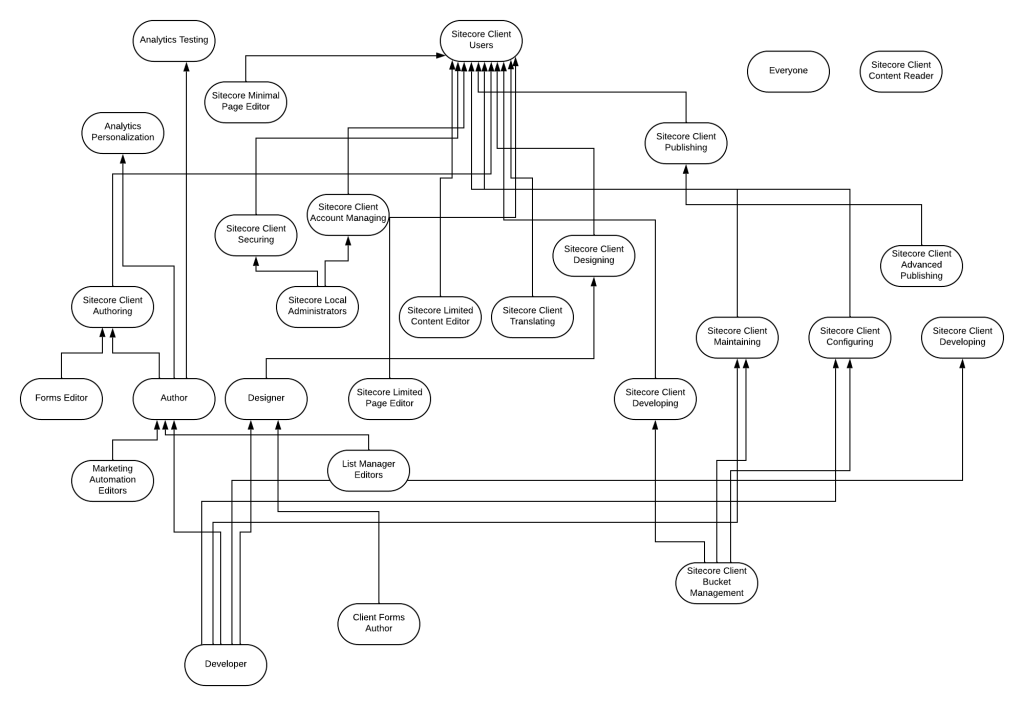
There is a plenty of documentation about this but I prefer to do something visual to help anyone reviewing this topic have a graphic idea of all existing roles. Hope it helps!


Mayra Olivo is a Senior Software Engineer at OSHYN, where she leads backend development and cloud architecture initiatives using .NET, Azure, and data analytics tools. With over 7 years of experience, she has delivered scalable digital solutions for global brands, specializing in performance optimization, automation, and digital experience platforms such as Sitecore and Optimizely.

She is also the founder of SUG Latam and a three-time Sitecore MVP, recognized for her leadership in tech communities across Latin America. Mayra focuses on innovation, community building, and empowering teams through knowledge sharing and strategic collaboration. Her work has contributed to award-winning digital platforms and community impact initiatives.